Can CB Radios Interfere With Wi-Fi? Understanding Radio Frequency Interference
One of the most common concerns among people considering a Citizens' Band (CB) radio is whether using one could disrupt their home internet. Questions such as "Can CB radios interfere with Wi-Fi?" and "Will my CB radio slow down my broadband?" appear regularly on forums and social media, often accompanied by stories of televisions buzzing or speakers crackling whenever someone nearby keys their microphone.
The reassuring answer is that under normal circumstances, CB radios do not interfere with modern Wi-Fi networks. The two technologies operate on entirely different parts of the radio spectrum, separated by thousands of megahertz. In simple terms, they're speaking completely different languages on completely different channels.
However, that doesn't mean radio frequency interference (RFI) can never occur. Poorly installed equipment, faulty electronics, illegal transmitters, damaged coaxial cables and badly filtered consumer devices can sometimes create interference that affects nearby electronics. In almost every case, though, the root cause is not the CB radio itself but an installation or equipment problem.
This guide explains why CB radio and Wi-Fi happily coexist, what radio frequency interference really is, how to prevent it, and what to do if you ever experience interference around your station.
Do CB Radios Interfere With Wi-Fi?
For the overwhelming majority of operators, the answer is no.
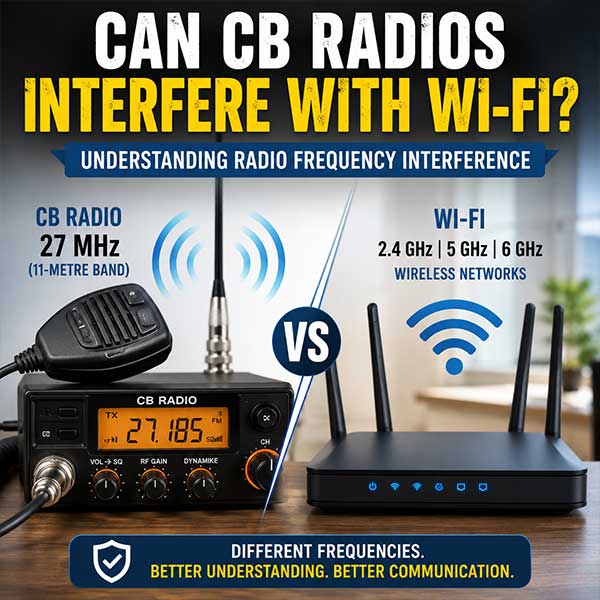
CB radios operate around 27 MHz, while modern Wi-Fi operates on 2.4 GHz, 5 GHz and increasingly 6 GHz. Those frequencies are separated by more than two billion hertz.
Because receivers are specifically designed to listen only within their intended frequency ranges, a Wi-Fi router simply ignores signals transmitted by a legal CB radio.
If your broadband appears to disconnect whenever someone transmits on CB, it's usually because one of the following is happening:
- Poor shielding inside another electronic device
- A faulty or damaged power supply
- Common-mode currents caused by an incorrectly installed antenna
- Over-modulated or illegally amplified transmissions
- A defective Wi-Fi router or network equipment
These situations are relatively uncommon and are almost always solvable through good installation practices.
Why CB Radios and Wi-Fi Use Different Frequencies
Every wireless technology occupies its own allocated section of the radio spectrum.
CB radio was designed decades before wireless networking existed. It occupies frequencies around 27 MHz because those wavelengths provide useful local communications and, during favourable propagation conditions, occasional long-distance DX contacts.
Wi-Fi was developed much later using microwave frequencies specifically chosen to support high-speed digital data over relatively short distances.
Because these frequency allocations are so widely separated, they simply do not overlap.
| Technology | Typical Frequency | Main Purpose |
|---|---|---|
| CB Radio | 26.965–27.405 MHz | Voice communication |
| Wi-Fi 2.4 GHz | 2.400–2.4835 GHz | Wireless networking |
| Wi-Fi 5 GHz | Approximately 5.1–5.9 GHz | High-speed wireless networking |
| Wi-Fi 6 GHz | Approximately 5.925–7.125 GHz | Latest Wi-Fi standards |
The gap between 27 MHz and 2.4 GHz is enormous. A CB transmitter simply isn't transmitting anywhere near the frequencies used by Wi-Fi.
What Frequency Does a CB Radio Use?
In the UK and much of Europe, CB radios operate around 27 MHz. This is often referred to as the 11-metre band.
Modern UK CB equipment supports FM, AM and Single Sideband (SSB) depending on the model and regulations.
Compared with microwave technologies such as Wi-Fi, these frequencies are considered relatively low and have very different propagation characteristics.
At 27 MHz, radio waves can:
- Travel around obstacles better than higher frequencies
- Cover many miles using modest transmitter power
- Occasionally travel internationally via atmospheric propagation
What Frequency Does Wi-Fi Use?
Modern wireless networking uses three primary frequency ranges:
2.4 GHz
The oldest and most widely supported Wi-Fi band. It offers good range but is often crowded due to Bluetooth devices, cordless equipment and other wireless technologies.
5 GHz
Provides higher speeds with less congestion, although its range is generally shorter than 2.4 GHz.
6 GHz
Used by Wi-Fi 6E and Wi-Fi 7 equipment, offering even more bandwidth and reduced interference from older devices.
All three operate thousands of megahertz above the CB band.
What Is Radio Frequency Interference (RFI)?
Radio Frequency Interference (RFI) occurs when unwanted radio energy affects the operation of another electronic device.
Importantly, interference does not necessarily mean two devices are using the same frequency.
Sometimes electronic equipment behaves like an unintended radio receiver because:
- Poor shielding allows RF energy inside.
- Internal wiring acts like an antenna.
- Power supplies lack adequate filtering.
- Cheap components fail to reject unwanted signals.
In these situations, almost any nearby transmitter—not just a CB radio—can trigger interference.
Can Poorly Installed CB Radios Cause Interference?
Yes.
A badly installed CB station is far more likely to create RFI than one installed correctly.
Examples include:
- Poor earth bonding.
- Loose PL-259 connectors.
- Damaged coaxial cable.
- Incorrect antenna mounting.
- High SWR.
- Excessive transmitter power.
None of these issues make CB inherently problematic—they simply allow unwanted RF energy to appear where it shouldn't.
Common Causes of CB Radio Interference
Poor-quality electronic equipment
Budget electronics sometimes omit proper RF filtering to reduce manufacturing costs.
Damaged coaxial cable
Split outer insulation or poor braid connections can allow RF energy to leak.
Loose connectors
Poor connections increase losses and may contribute to common-mode currents.
Incorrect antenna placement
Installing antennas directly beside domestic wiring or television aerial cables increases the chance of unwanted coupling.
Illegal amplifiers
Linear amplifiers operating outside legal limits produce much stronger RF fields and often generate harmonics that may affect nearby equipment.
Can High SWR Cause Problems?
A high Standing Wave Ratio (SWR) doesn't directly interfere with Wi-Fi, but it indicates your antenna system is not working efficiently.
High SWR can:
- Reduce transmitted signal strength.
- Increase reflected power.
- Create unwanted RF currents on the outside of coaxial cable.
- Increase the likelihood of RFI around nearby electronics.
Keeping SWR below around 1.5:1 is generally considered good practice, although values up to 2:1 are usually acceptable for legal CB operation.
Does Transmitter Power Make a Difference?
Yes—but perhaps not in the way many people think.
Legal UK CB radios operate at relatively modest power levels designed for reliable communications.
Problems become far more likely when operators use:
- Illegal linear amplifiers.
- Modified export radios.
- Poorly adjusted transmitters.
- Over-modulated microphones.
More power does not necessarily produce better communications, but it does increase the strength of any unwanted RF energy around the installation.
Can Cheap Electronics Be Affected?
Sometimes.
Examples include:
- Poorly shielded computer speakers.
- Budget televisions.
- Low-cost soundbars.
- Cheap LED lighting drivers.
- Switch-mode power supplies.
- Wireless doorbells.
- Audio amplifiers.
These devices may contain inadequate filtering, allowing strong nearby RF signals to enter their circuitry.
Again, this isn't because the CB signal is on the same frequency as the equipment—it is because the equipment itself has insufficient protection.
Why Modern Wi-Fi Equipment Is Usually Unaffected
Modern Wi-Fi routers are engineered with sophisticated filtering, shielding and digital signal processing.
They are designed to reject signals outside their intended operating bands, including powerful nearby broadcast stations and other radio services.
Provided the equipment is functioning correctly and installed according to the manufacturer's recommendations, legal CB transmissions should have no measurable effect on Wi-Fi performance.
How to Reduce the Risk of Interference
Install the antenna correctly
A properly mounted antenna is the single biggest factor in reducing unwanted RF problems.
Keep SWR low
Tune the antenna using an SWR meter before regular operation.
Good-quality 50-ohm coax with intact shielding prevents RF leakage and improves station efficiency.
Choose quality connectors
Poorly fitted PL-259 connectors often cause more problems than the cable itself.
Avoid excessive power
Legal transmitter power is more than adequate for everyday CB communications.
Separate cables where practical
Avoid running coaxial cable tightly alongside mains wiring, Ethernet cables or television aerial feeds for long distances.
Good Installation Practices
- Use clean metal-to-metal antenna mounting.
- Secure coaxial cable properly.
- Avoid sharp bends.
- Weatherproof outdoor connectors.
- Inspect cables regularly.
- Use quality equipment from reputable manufacturers.
Proper Earthing and Bonding
Vehicle installations benefit from good bonding between body panels, helping provide an effective RF ground.
Base stations should follow sensible earthing practices appropriate for the installation and local electrical regulations.
Good grounding reduces unwanted RF currents and often improves overall station performance.
The Importance of a Well-Tuned Antenna
The antenna is the most important component of any CB station.
A properly tuned antenna:
- Radiates power efficiently.
- Reduces reflected energy.
- Produces clearer signals.
- Minimises unwanted RF around the station.
- Protects the transmitter.
Taking time to tune an antenna properly pays dividends in both performance and reliability.
Using Quality Coaxial Cable
Cheap coax often suffers from inconsistent shielding and higher signal losses.
Well-known cable types from reputable manufacturers generally provide:
- Better screening.
- Lower losses.
- Greater durability.
- Improved resistance to moisture.
Inspect cables periodically for crushing, abrasion or water ingress.
Avoiding Over-Modulation and Illegal Power Amplifiers
Over-modulated transmitters create distorted audio and wider transmitted signals than necessary.
Illegal linear amplifiers dramatically increase RF levels and significantly increase the likelihood of interference.
Operating within legal limits is not only compliant with regulations—it also makes for a cleaner, better-quality signal.
Troubleshooting Interference Problems
If interference appears after installing a CB radio, work methodically.
- Check your SWR.
- Inspect all coaxial connectors.
- Examine antenna mounting.
- Reduce microphone gain if adjustable.
- Disconnect accessories one at a time.
- Test using another radio if available.
- Ask another operator for an audio report.
- Determine whether the interference only occurs during transmission.
Most problems can be traced to installation faults rather than defective radios.
When the Problem Isn't Your CB Radio
Not every burst of interference is caused by your station.
Possible alternative causes include:
- Faulty LED lamps.
- Broadband over powerline adapters.
- Solar inverter noise.
- Switch-mode power supplies.
- Nearby amateur radio stations.
- Industrial electrical equipment.
If interference occurs even when your CB radio is switched off, the source clearly lies elsewhere.
Common Myths About CB Radio Interference
"CB radios always interfere with Wi-Fi."
False. Modern Wi-Fi equipment operates on completely different frequencies and should not be affected by legal CB operation.
"Higher power always gives better performance."
False. Antenna efficiency is usually far more important than transmitter power.
"Any interference means the radio is faulty."
False. Installation quality, damaged cables and poorly filtered electronics are much more common causes.
"A perfect SWR guarantees no interference."
False. Good SWR is important but cannot compensate for poor installation or faulty nearby equipment.
Using CB Radio Responsibly
A properly installed, legally operated CB station is extremely unlikely to cause problems for modern home networking equipment. Concentrating on good antenna tuning, sensible cable routing, quality components and legal operating practices will provide better performance while minimising the chance of radio frequency interference.
As your experience grows, keeping a record of contacts can also help identify how your station performs under different conditions. Platforms such as CB Radio Logbook allow operators to log contacts, participate in organised radio nets and track station activity while becoming part of the wider CB community.
Further Reading
- Understanding SWR
- CB Radio Antennas Explained
- How to Install a CB Radio
- Are CB Radios Legal in the UK?
- CB Radio Frequencies Explained
Frequently Asked Questions
Can CB radios interfere with Wi-Fi?
No. Under normal operating conditions, legal CB radios do not interfere with Wi-Fi because they operate on completely different frequency bands.
Can a badly installed CB radio cause interference?
Yes. Poor grounding, damaged coaxial cable, loose connectors or high SWR can increase the chance of radio frequency interference affecting poorly protected electronics.
Why doesn't my Wi-Fi use the same frequencies as CB radio?
Wi-Fi operates on microwave frequencies around 2.4 GHz, 5 GHz and 6 GHz, whereas CB radio operates around 27 MHz.
Can high SWR interfere with my internet?
Not directly. High SWR indicates an inefficient antenna system, which can increase unwanted RF currents but does not interfere with Wi-Fi frequencies themselves.
Can CB radios affect televisions?
Occasionally, older or poorly shielded televisions may experience interference if nearby CB installations are poorly configured.
Should I use a linear amplifier?
No. Illegal amplifiers increase the likelihood of interference, produce poorer signal quality and breach UK CB regulations.
What is the best way to prevent interference?
Use a properly tuned antenna, quality coaxial cable, secure connectors, good grounding and operate within legal power limits.
Can faulty household electronics cause interference instead?
Yes. Poorly filtered LED lighting, cheap power supplies and defective electronic devices are common sources of RF-related problems.
Does using better coax reduce interference?
Quality coaxial cable with effective shielding helps reduce RF leakage and improves the efficiency of your station.
Will modern Wi-Fi routers normally be affected by CB radio?
No. Modern routers include filtering and shielding specifically designed to reject signals well outside their intended operating frequencies.
Join the CB Radio Logbook
Track every QSO, map your contacts, and connect with operators near you. Create your free account and get on the air.
Create your account